RUN 3
OF 8 · 1KM INDOOR
3:41
SEGMENT TIME
TO TARGET
0:19
TOTAL
38:14
163
BPM
Z3
ZONE
+0:08
CUMUL
NEXT · SLED PUSH · 50m · 102kg
During a run
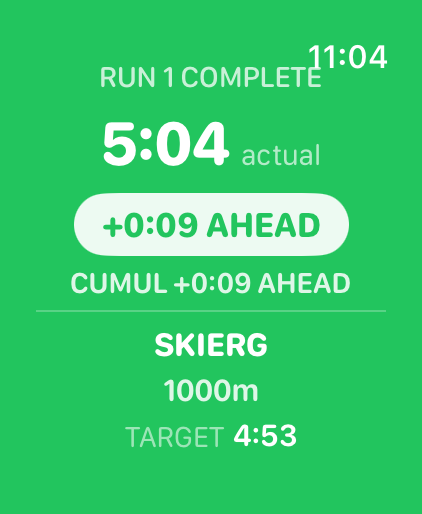
Transition screen showing run complete, delta ahead, and next station briefing
Every transition
SLED PUSH
STATION 3 · 50m · 102kg
2:51
SEGMENT TIME
TO TARGET
-0:06
TOTAL
41:07
176
BPM
Z4
ZONE
+0:04
CUMUL
NEXT · RUN 4 · TARGET 4:00
During a station
Apple Watch · Hyrox Athletes

Know
Your Pace.

The only Apple Watch app that shows you exactly how far ahead or behind pace you are — every station, every run, every transition. No guessing. No pen on your hand.

One-time purchase — no subscription
Available now on the App Store
Apple Watch Series 4+ · iOS 16+ · watchOS 9+
8 RUNS · 8 STATIONS · 16 SEGMENTS TRACKED
OPEN MEN · OPEN WOMEN · PRO MEN · PRO WOMEN
LIVE DELTA · SEGMENT + CUMULATIVE
APPLE WATCH · STANDALONE · NO iPHONE NEEDED
ONE-TIME PURCHASE · NO SUBSCRIPTION
8 RUNS · 8 STATIONS · 16 SEGMENTS TRACKED
OPEN MEN · OPEN WOMEN · PRO MEN · PRO WOMEN
LIVE DELTA · SEGMENT + CUMULATIVE
APPLE WATCH · STANDALONE · NO iPHONE NEEDED
ONE-TIME PURCHASE · NO SUBSCRIPTION
The problem
You wrote your goal splits on your hand.
Every Hyrox athlete does it. There's no tool that tells you — in real time — whether you're actually on track.
Every app is just a stopwatch
You get splits after the race. You need them during it. Knowing you ran 4:22 on Run 3 is useless — knowing you need to run 3:51 on Run 4 to stay on target is everything.
Going out too hard destroys your race
Run 1 adrenaline is real. You push hard, blow your HR, and pay for it on Wall Balls. By then it's too late. You need live feedback, not a post-mortem.
No app shows you the cumulative delta
You're 17 seconds behind pace right now. If you push the next run, you can claw back 12 of those seconds. No existing app tells you this. We built the one that does.
How it works
SET.
RACE.
KNOW.
Three steps. One crown press per run. Everything else is automatic. The watch does the maths so you can focus on the race.
STEP 01
SET YOUR PLAN
Set up on iPhone before race day — enter your goal time, tell us your strongest and weakest stations, and we generate personalised splits for all 16 segments. Sync to watch in one tap. No iPhone needed on race day.
STEP 02
RACE ON YOUR WRIST
Crown press at the end of each run. Station clock starts automatically. The briefing card shows your split result, cumulative delta, and next station specs — while you're already moving.
STEP 03
KNOW YOUR DELTA
Every screen shows two numbers: segment countdown to your target, and cumulative ahead/behind for the whole race. One glance. No maths. No guessing.
Interactive demo
Try it yourself
Click through the race states. This is exactly what you'll see on race day.
RUN 3
OF 8 · 1KM INDOOR
3:41
SEGMENT TIME
TO TARGET
0:19
TOTAL
38:14
163
BPM
Z3
ZONE
+0:08
CUMUL
NEXT · SLED PUSH · 50m · 102kg
CROWN → END RUN
Transition screen: run complete, delta, next station
SLED PUSH
STATION 3 · 50m · 102kg
2:51
SEGMENT TIME
TO TARGET
-0:06
TOTAL
41:07
176
BPM
Z4
ZONE
+0:04
CUMUL
NEXT · RUN 4 · TARGET 4:00
CROWN → END STATION
SLED PUSH
COMPLETE
41:18
3:02
actual
-17s BEHIND
CUMUL -00:07 BEHIND
RUN 4
1km indoor
TARGET 4:00
RACE COMPLETE
FINAL TIME
1:23:44
+1:16 vs goal
GOAL1:25:00
RUN AVG4:02/seg
BESTSki Erg +28s
WORSTSled Push -17s
FULL BREAKDOWN ON iPHONE
01
RUN
R→S
02
STATION
S→R
FINISH
During a run
Mid-run the watch shows elapsed time and a live countdown to your target. No GPS pace — Hyrox runs are indoor and GPS is unreliable. The countdown is the pacing signal. Green = you're within target. Red = you're over.
Segment elapsed time — large, always visible
Countdown to target — colour-coded green/red
Cumulative delta in the stats row
Crown press ends run and starts station clock simultaneously
Division-aware specs
The app knows
every station.
Correct weights and distances for every division, shown on your wrist before each station. You never have to remember 102kg mid-sled.
# Station Open Men Open Women Pro Men Pro Women
S1Ski Erg1000m1000m1000m1000m
S2Sled Push102kg78kg152kg102kg
S3Sled Pull102kg78kg152kg102kg
S4Burpee Broad Jump80m80m80m80m
S5Row Erg1000m1000m1000m1000m
S6Farmers Carry2×24kg2×16kg2×32kg2×24kg
S7Sandbag Lunges20kg · 100m10kg · 100m30kg · 100m20kg · 100m
S8Wall Balls9kg to 6m6kg to 5m9kg to 6m6kg to 5m
What's included
V1 is live.
No vaporware.
Here's exactly what's in V1, and what's coming in V2. No surprises.
FeatureV1V2
Live delta on Apple Watch
16-segment race plan
Auto-generated splits
Manual split entry
Division-aware station specs
HR zone display
Configurable haptics
Post-race iPhone breakdown
Simulation run mode
Garmin supportV2
Doubles modeV2
Community response
What the Hyrox community said.
We posted in r/hyrox before building. Here's what real athletes told us.
26,000
Views on r/hyrox
48
Upvotes
0
Paid promotion
u/mylesbr · r/hyrox
"... At station 6 your brain is mush and you need exactly one piece of information: am I ahead or behind, and by how much."
u/Thin_Road_88 · r/hyrox
"The apps to do everything end up being useless when you're gassed at sled push 2 and just need one number."
From an organic post in r/hyrox — no paid promotion, no seeded comments.
Download
Available now.
One-time purchase. No subscription. Yours forever.
Why we built this
"I raced Hyrox with my target splits written on my hand. There has to be a better way."
Desmond de Moussac · Founder, RoxPacer
Hyrox athlete and software developer based in Singapore. Built RoxPacer to solve the exact problem I kept hitting on race day — and figured I wasn't the only one.
RUN 3
OF 8 · 1KM INDOOR
3:41
SEGMENT TIME
TO TARGET
0:19
TOTAL
38:14
163
BPM
Z3
ZONE
+0:08
CUMUL
NEXT · SLED PUSH · 50m · 102kg
Transition screen: run complete, delta, next station
SLED PUSH
STATION 3 · 50m · 102kg
2:51
SEGMENT TIME
TO TARGET
-0:06
TOTAL
41:07
176
BPM
Z4
ZONE
+0:04
CUMUL
NEXT · RUN 4 · TARGET 4:00
SLED PUSH
COMPLETE
41:18
3:02
actual
-17s BEHIND
CUMUL -00:07 BEHIND
RUN 4
1km indoor
TARGET 4:00
RACE COMPLETE
FINAL TIME
1:23:44
+1:16 vs goal
GOAL1:25:00
RUN AVG4:02/seg
BESTSki Erg +28s
WORSTSled Push -17s
01
RUN
R→S
02
STATION
S→R
FINISH
ESC TO EXIT